
Growing up safely online. With trust, not control.
Children and teenagers are online every day. They game, chat, watch videos, use social media and discover more and more of the digital world.
That's fun and educational. But there are risks too: scams, cyberbullying, grooming, unwanted contact and misleading websites.
KORYVIQ helps parents protect their child online, without secretly reading along.
Where possible, KORYVIQ looks for risks directly on your child's device. You then get a clear notice when something happens that needs your attention.
No full conversations. No secret monitoring. Real insight and protection.


Four simple steps to more peace of mind
KORYVIQ is designed so parents and children work together on using a smartphone safely.
-
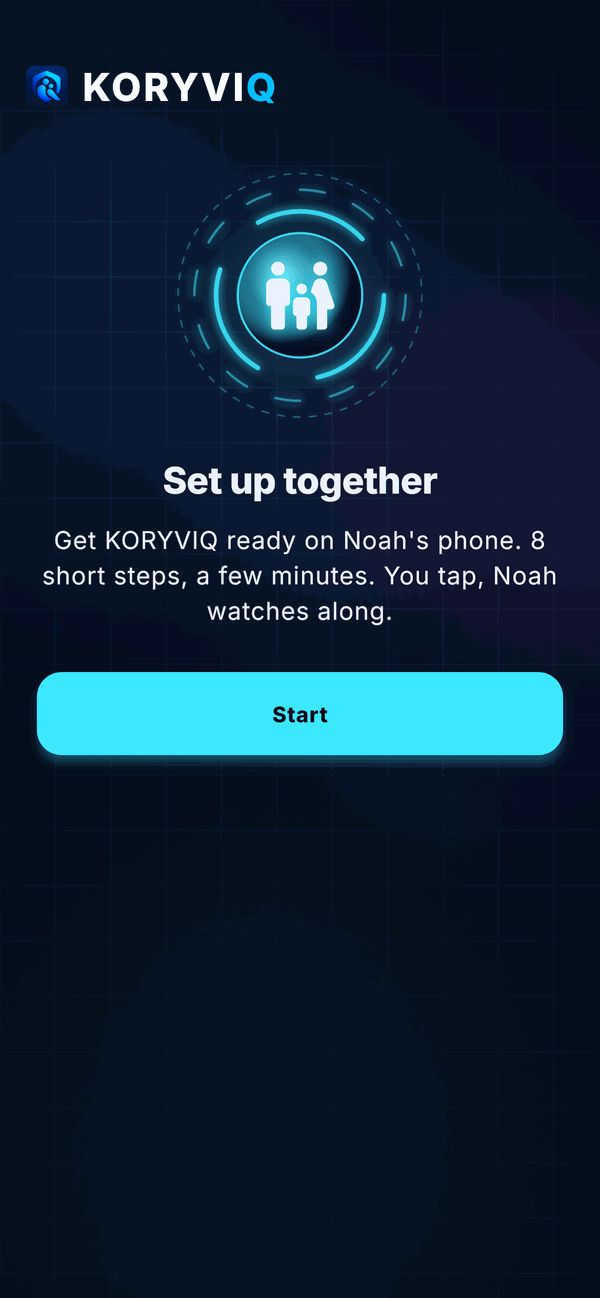
Set up KORYVIQ together
You install KORYVIQ on the phone together with your child.
So your child knows KORYVIQ is there and which agreements you have made.
No installing behind your child's back.
-
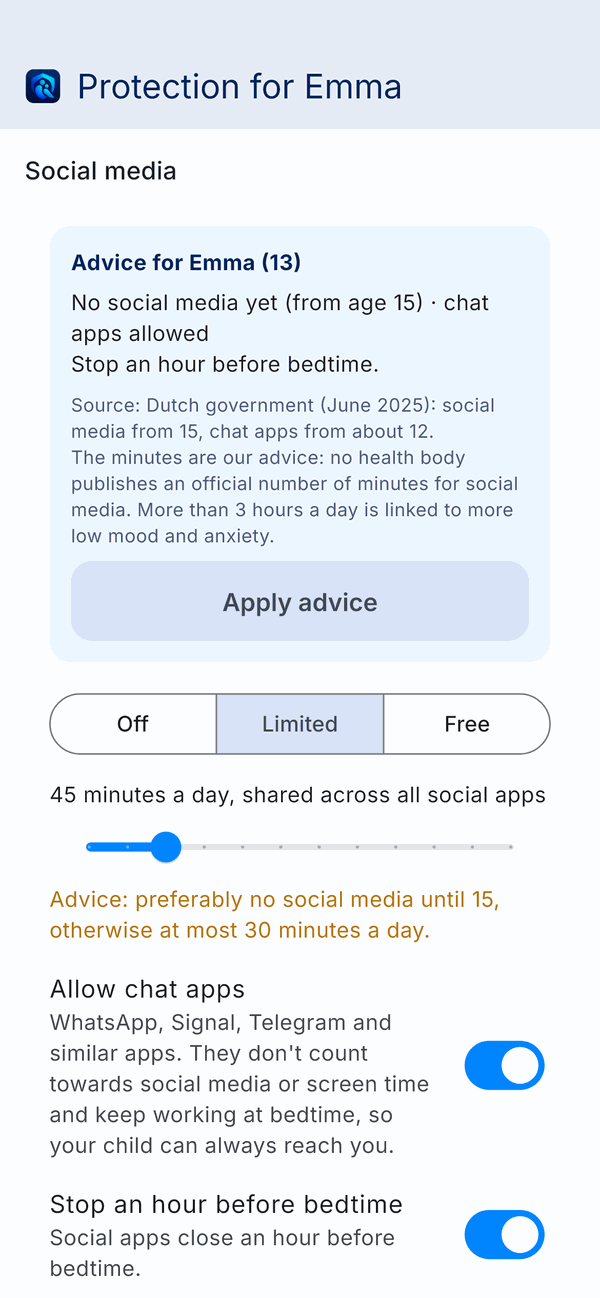
You decide the agreements
KORYVIQ gives practical advice per age about what may be sensible.
You then decide which rules suit your family. Think of:
- screen time
- bedtime
- school time
- websites and apps
- social media
- spending and purchases
-
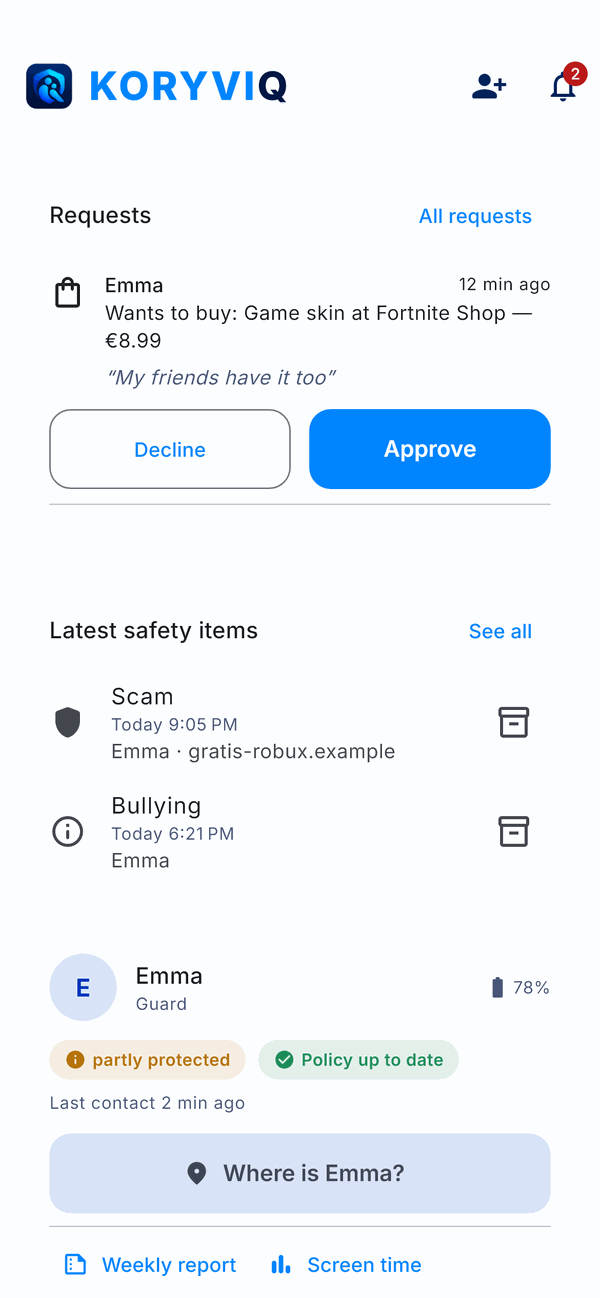
Your child can ask for something
Does your child want to stay online longer, use an app, visit a website or buy something online? Then they can simply send a request.
All requests sit at the top of your home screen, newest first. You see exactly what your child asks. For a purchase that is what, in which shop, the amount and your child's note. You approve or decline right there, and a notification opens that one request.
Your child asks. You decide.
That way safety isn't a fight, but part of the agreements within your family.
-
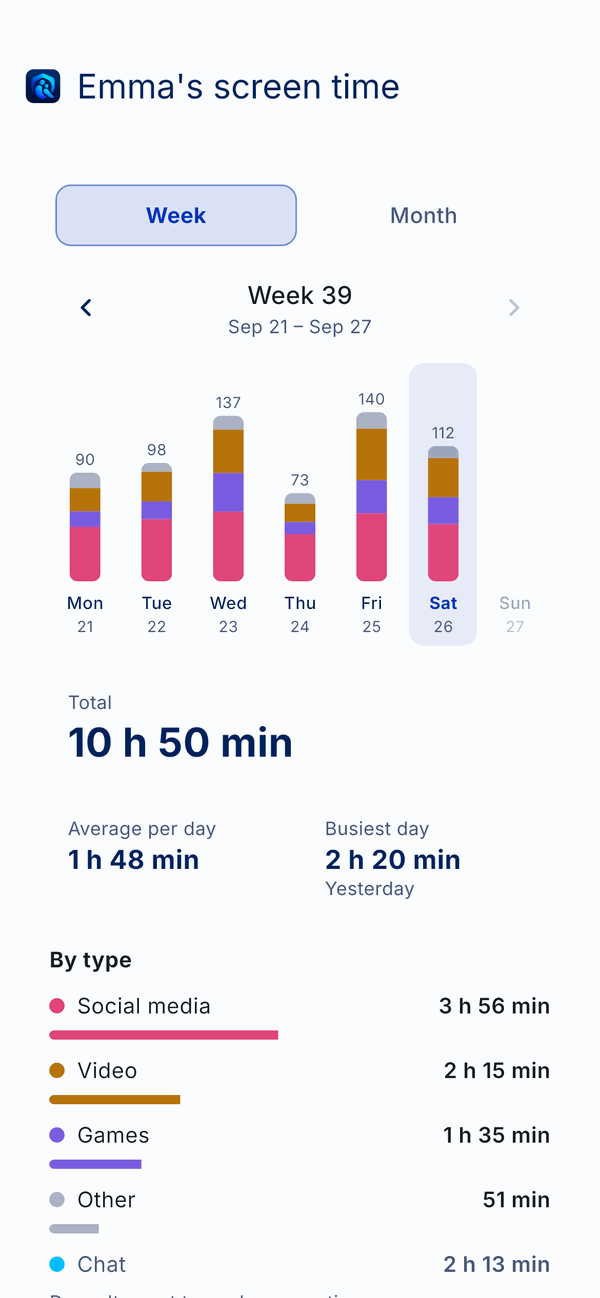
You keep the overview
The parent app shows you at a glance how phone use is going.
You see, for example, screen time and important safety notices. If your child has a phone and a tablet, you see one bar per child, plus how much was on each device.
Clear, well organised, and without having to check all the time.


Real screens from the app, with a sample family.
Protection for what really matters
These are the things parents ask us about first. You see the signal and what you can do, never your child's private conversations.
-
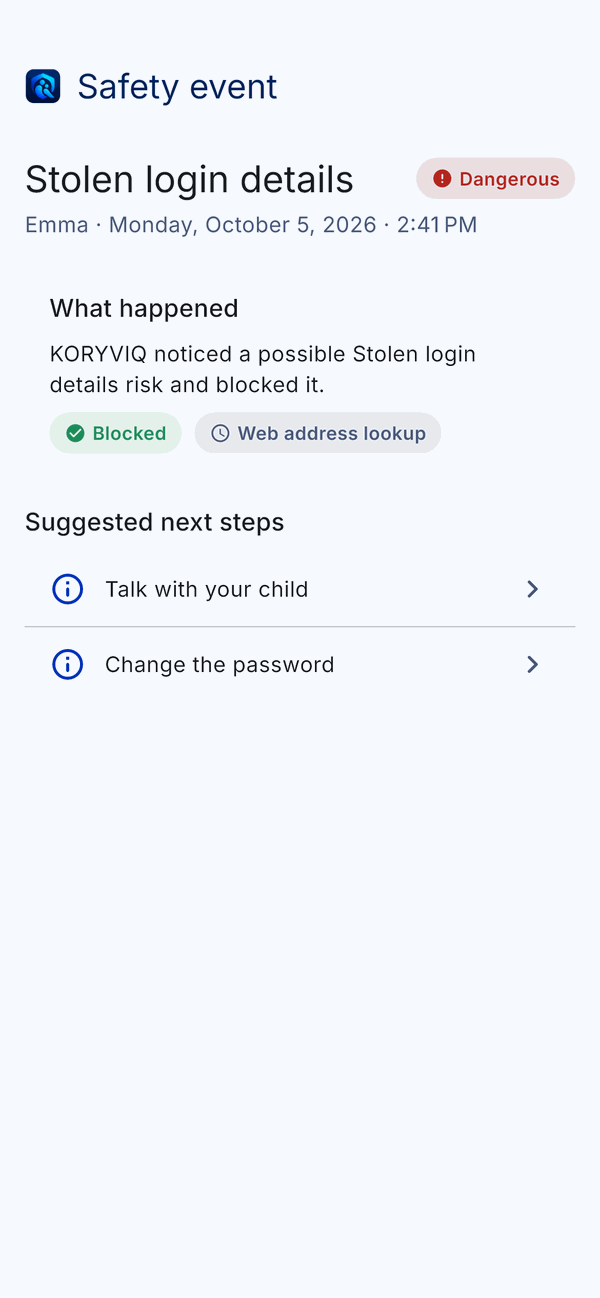
Block scams
A fake login page, free game items or someone pretending to be a service they know: children fall for it more easily than you think.
KORYVIQ blocks known phishing and scam sites and tells you what happened and what you can do.
Blocked, and you know about it.
Blocking phishing, malware and fake game sites is in every plan, Free included. Scam Guard, which recognises scams in the chats of Discord, Roblox, Fortnite and Steam, is in Protect+.
-
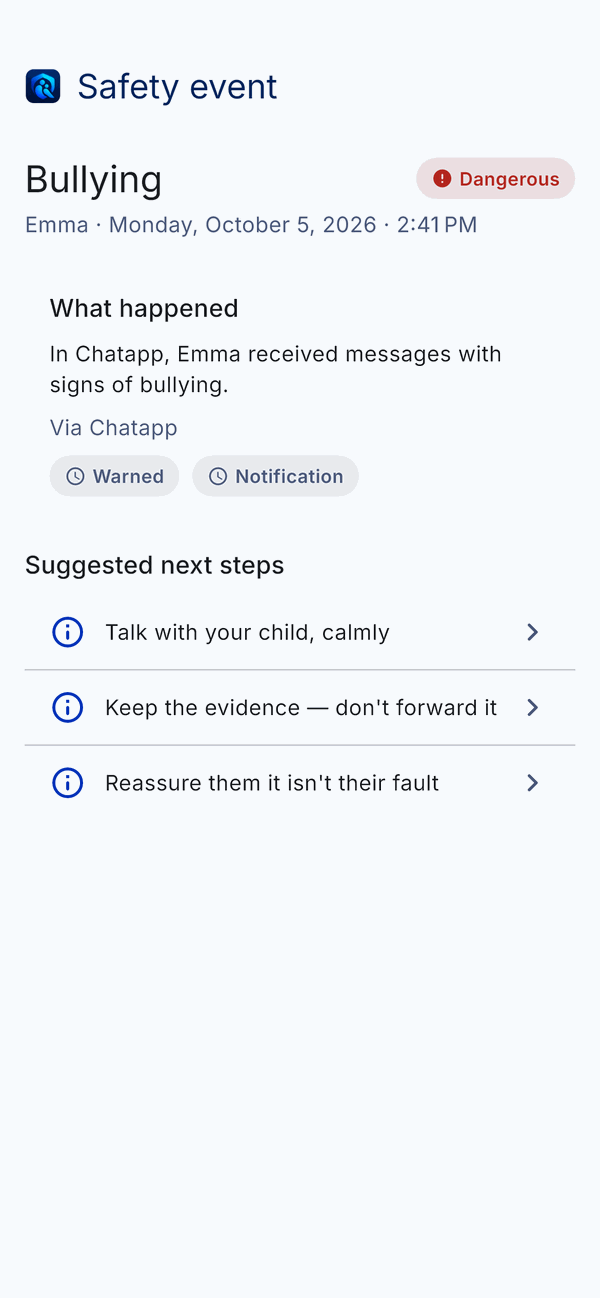
Spot bullying
Bullying often happens in the chats and games you can't see into.
KORYVIQ recognises signs of bullying and extortion on the phone itself and gives you practical steps: talk calmly, keep the evidence, reassure your child.
You see the signal, never the text.
Social Guard is in Family. Context Guard, which reads the whole conversation, is in Protect+.
-
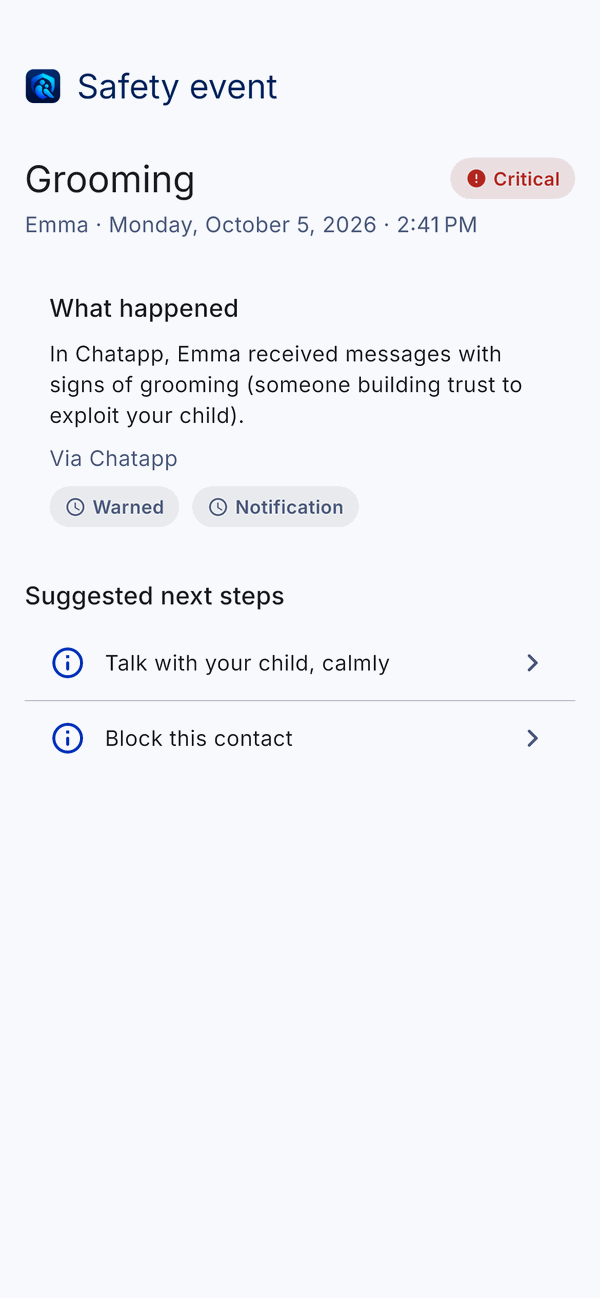
See grooming in time
Someone slowly winning your child's trust, asking for photos or personal details, or asking them to keep it secret.
KORYVIQ recognises those signs on the phone itself and warns you straight away, even when the app is closed. If you switch it on, the phone can even hold back a clearly dangerous message before your child reads it. Your child then gets a calm explanation, with helplines.
From the alert you can pause the app, or hold back that sender and help your child block them.
An alert in plain language, without you having to read every conversation.
Social Guard and holding back dangerous messages are in Family, as is pausing an app. Context Guard, which reads the whole conversation, and holding back a sender are in Protect+.
-
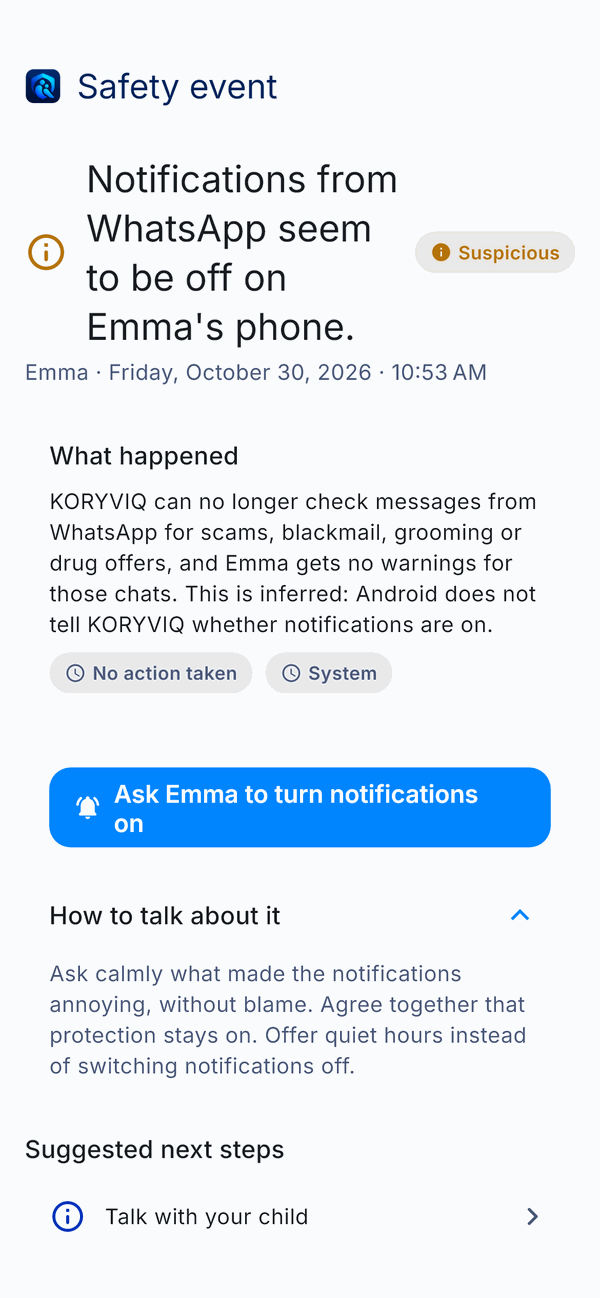
Notice when chats go silent
KORYVIQ reads message previews from notifications. If your child switches off the notifications of WhatsApp, Messages or Snapchat, that chat is no longer protected.
KORYVIQ notices it, tells you which app and explains the risk. Your child gets a calm card with a button straight to that app’s notification settings, and you get a tip for the conversation.
You see which app, never what was said.
-
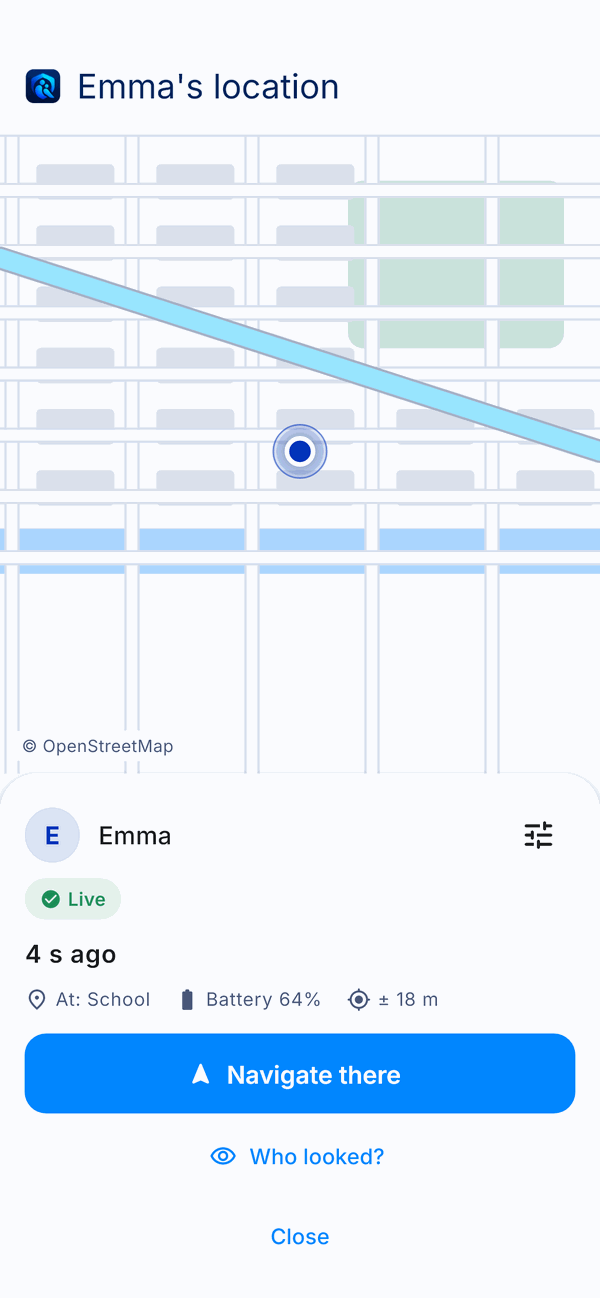
See where your child is
Open the map and you see live where your child is, with the battery level. Want to know your child got to school safely? Take a look.
The live map works while you look, and your child sees who looked. In between, the phone keeps only one last known place up to date, after real movement (no route, no history, kept 24 hours at most), plus one position when the battery is nearly empty and with SOS.
With school time set, apps are closed during lessons. And in an emergency your child has an SOS button: it sends one location (encrypted) and opens the live map for you at once, with the SOS spot marked. We keep that position for 24 hours at most.
Set trusted places, such as school and home. If your child (12 or older) has a free period during school hours and leaves school, you get a quiet notice, not an alarm, and another when they are back. Only if your child stays away for more than 2 hours while school is still on do you get one important notification per day. After school ends you get nothing.
Look when you want to. Never followed all day.
Live location and SOS (with location) are in Free. School time is in Family.


Real screens from the app, with a sample family. Which features you get depends on your plan and your device.
Decide whether your child can pay online
Children buy faster than you think: in a webshop, with a payment app or on a payment page. When you set things up you choose per child what is allowed, and you can change it any time.

Webshops and payment pages
Block webshops or payment pages, or just get a notice. By default KORYVIQ sets this to your child's age.
Payment apps
Google Wallet, Tikkie, bank apps and similar apps stay closed until you say yes.
Your child asks, you decide
Does your child want to buy something or open a payment app anyway? Then they ask you for permission in the app.
Blocking works per website: a webshop closes entirely, not just its checkout, and the list of payment providers does not cover every shop. KORYVIQ cannot stop a purchase inside an app that is allowed. It does recognise such a purchase afterwards from the notification of Google Play, your bank or the game store, and adds it to the spending. Tip: also have Google Play ask for a password or fingerprint on purchases.
Limiting webshops, payment pages and payment apps is in Family.
Purchases and pairing, clearer than ever
Your child asks, you decide and you also choose how it gets bought. KORYVIQ does not handle payments itself: the purchase goes through the shop as usual.
-
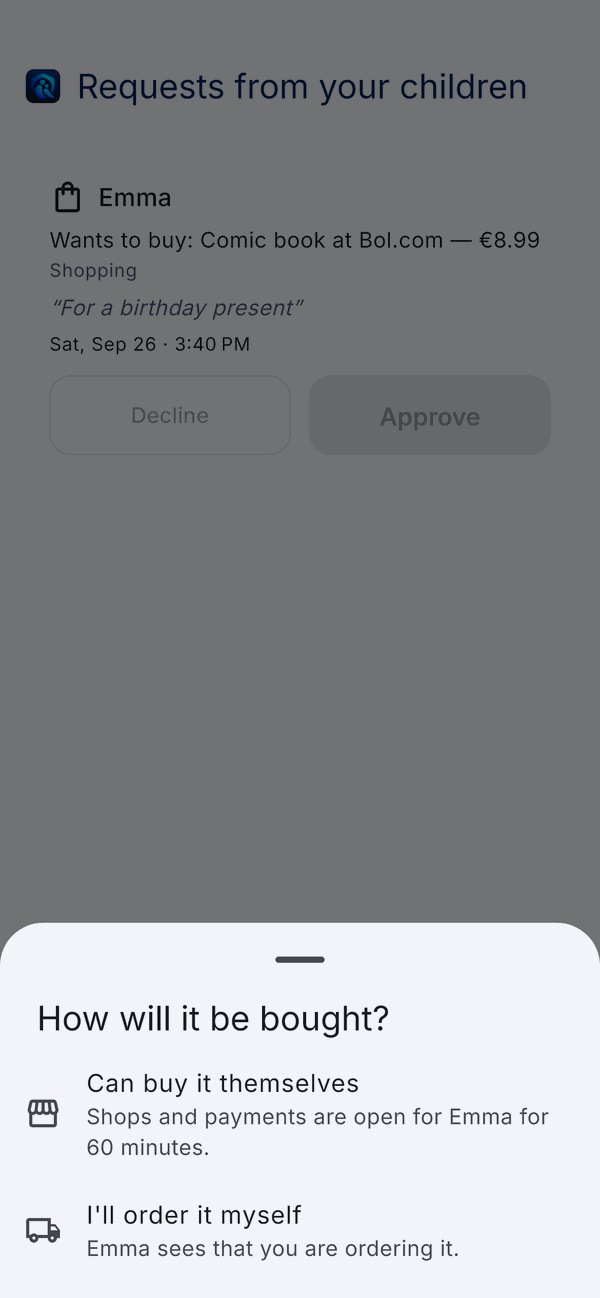
You choose how it gets bought
When you approve a purchase you pick one of two ways:
- Can buy it themselves: webshops and payment pages or apps are open for 60 minutes for that child. Then it closes by itself, even if your child changes the clock.
- I'll order it myself: your child's product link goes only to you. You tap 'Ordered' and your child sees that you ordered it.
If the amount turns out different, you correct it afterwards to what was really paid.
KORYVIQ does not process payments and cannot set a limit inside a shop.
-
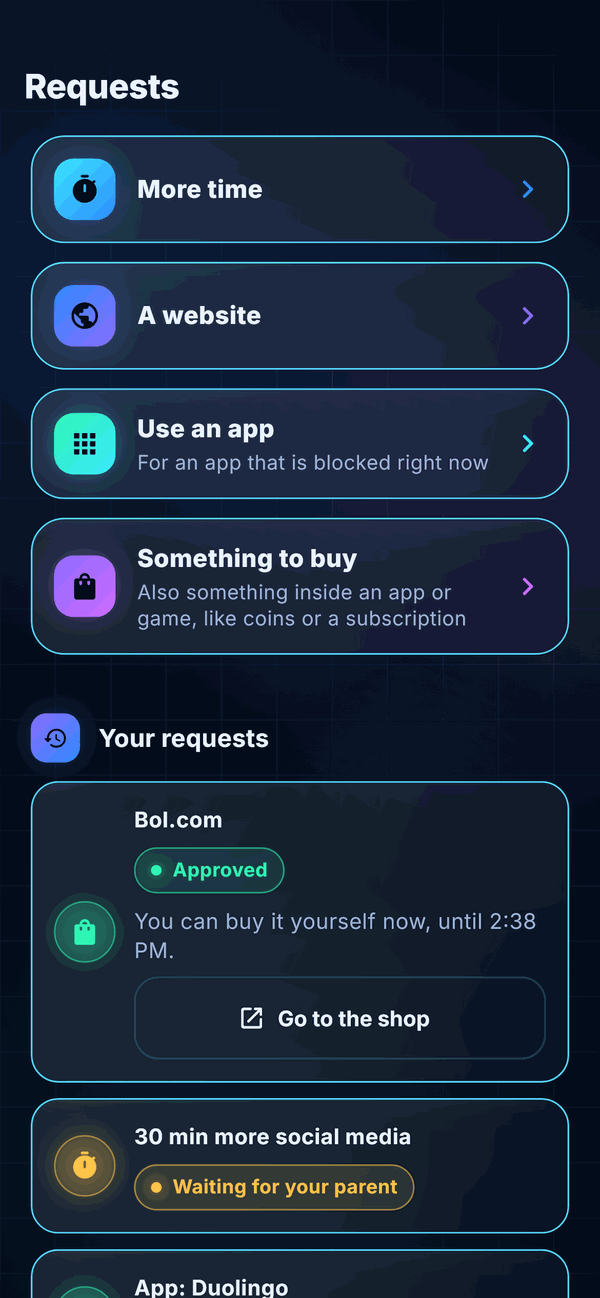
Your child sees exactly what happens
Your child picks 'Use an app' for an app that is blocked right now (the text is already filled in), or 'Something to buy', also for purchases inside an app or game.
If they may buy it themselves, they see 'Go to the shop', with the product link if they added one. If you order it, your child sees 'Your parent has ordered it'.
We store the product link encrypted and delete it as soon as it is no longer needed, after 7 days at the latest.
-
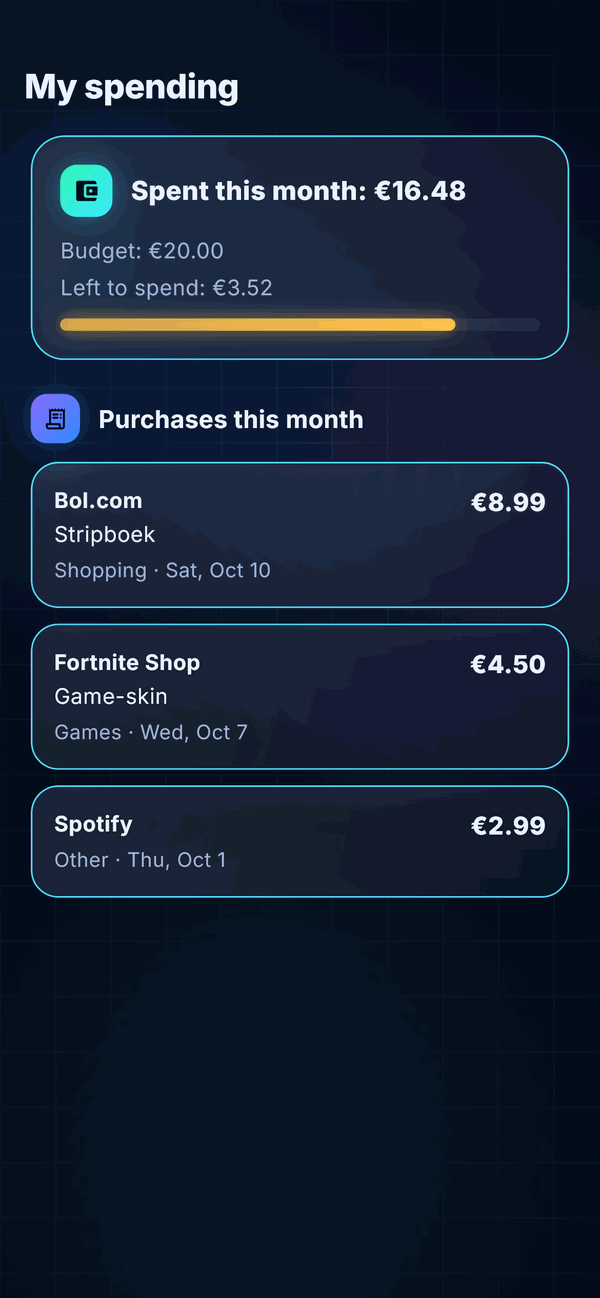
My spending
Your child sees what they spent this month and, if you set a budget, what is left. Every purchase is listed with the amount that was really paid.
Your own Spending screen follows right away, with the history per day, week or month. Purchases the phone recognises from the notification of Google Play, a bank or payment app or a game store are added by themselves. Only the shop and the amount reach you, never the text of the notification or an account number.
The same overview for your child and for you.
-
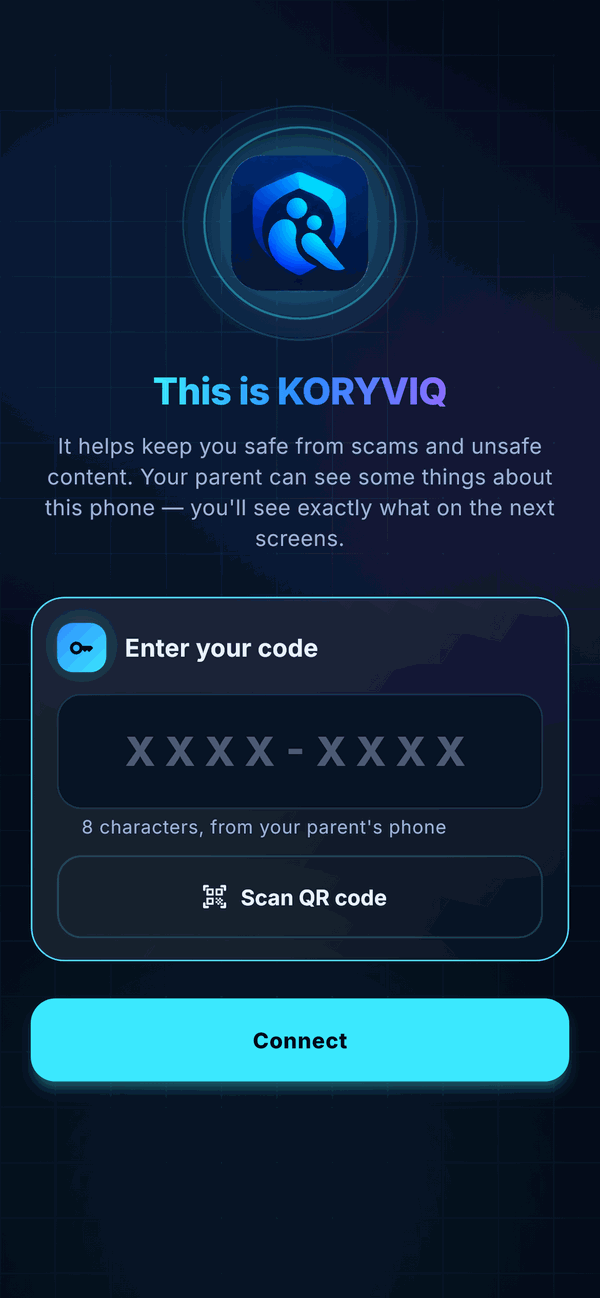
Pairing with a scan
On your child's phone tap 'Scan QR code' and scan the code on your phone. It uses Google's scanner, so KORYVIQ normally needs no camera permission for this. Only on a phone where Google's scanner cannot be installed, KORYVIQ asks for the camera at that moment, just to scan this code (nothing is recorded or stored). Scanning not working? Type the code. The dash in the code appears by itself.
Your child still taps Connect and you confirm the phone. If you scan the QR code with a phone that does not have KORYVIQ yet, it opens Google Play.


Real screens from the app, with a sample family.
Children face real risks online
Parents often have two choices: not knowing what's happening at all, or trying to control everything.
KORYVIQ takes a different approach.
Scams keep getting more convincing
A fake login page, an offer of free game items or someone pretending to work for a well-known service: children are easily misled.
KORYVIQ helps recognise such risks and block them where that's technically possible.
Danger often sits in ordinary apps
Bullying, grooming or unwanted contact doesn't only happen on websites known to be 'dangerous'.
It can happen in the games, chats and social media children use every day.
Privacy still matters
A child should feel safe at home. That's why, by default, message content is not sent to or stored on our servers.
You get information about a safety risk, not automatically the whole conversation.
Honest about what can and can't be done
No app can see everything or stop everything. Android and iPhone each have their own technical limits.
That's why KORYVIQ clearly shows which protection is available on a given device.
No false sense of security. Just honesty.
KORYVIQ analyses risks on the device
Where the technology and the operating system allow it, the analysis happens directly on your child's phone.
So the content itself doesn't have to be sent to KORYVIQ by default.
Analysis on the device
Links, notifications and certain activity can be checked for possible risks on the device.
You get a safety notice
If something happens that may need attention, you get a clear notice in plain language.
You also get word when the app is closed. Your lock screen shows only KORYVIQ, never the content.
You decide what happens next
Depending on the situation you can, for example:
- mark something as safe;
- block a website or source;
- change the settings;
- talk with your child about what happened.
Your child knows what's happening
KORYVIQ isn't secret. Your child can see:
- what is checked;
- what isn't checked;
- which agreements apply;
- which settings are active.
For example: “Someone tried to get Lucas’s Roblox password through a suspicious website. The website was blocked.”
So you see what's going on and what KORYVIQ did, without automatically having to read the whole conversation.
A young child needs different guidance than a teenager
That's why KORYVIQ works with different age modes.
Protect
Extra guidance and clear boundaries. For example:
- selected apps and content;
- protection against unknown contacts;
- more overview for parents.
Guide
More freedom, with extra protection against online risks. For example:
- checks on suspicious contacts;
- protection against scams;
- agreements on screen time and spending;
- an explanation when something is blocked.
Guard
More independence and privacy.
KORYVIQ protects in the background as much as possible and gives teenagers room to make requests or discuss agreements.
Trust
The focus shifts to safety and independence. Less control, more trust.
Your child can see which agreements are active and talk them through with you.
So KORYVIQ grows with your child.
What does KORYVIQ do?
Depending on the device and the available features, KORYVIQ can:
- check links and certain notifications for risks
- warn about possible scams
- recognise signs of bullying, grooming and extortion, by analysing certain notifications on the device
- block known dangerous websites
- set screen time
- set bedtime and school time
- make agreements about apps and social media
- receive requests from your child, gathered at the top of your home screen, with what, where and how much for a purchase
- one child on several devices (phone and Android tablet) with one shared screen-time total
- manage spending and budgets, and when you approve a purchase choose: your child may buy it themselves (shops and payments open for 60 minutes) or you order it
- show your child their own spending this month, under My spending
- limit paying online: block webshops, payment pages and payment apps, or get a notice
- see live where your child is, while you look
- send an SOS alert with location: you open the live map at once, with the answer buttons always in view at the bottom
- give you a quiet notice when your child (12+) leaves a trusted place such as school during school hours, and when they are back (off by default, you switch it on)
- ask for your permission or code before KORYVIQ is switched off or removed on the phone
- show apps under ‘Worth a look’ first when they didn’t come from an app store or were installed in the last 7 days
- always block phishing, malware and hidden crypto-miners, also on sites made to look like Discord, Roblox, Fortnite or Steam
- allow or block websites yourself, and show your child which ones they are
- block shops for vapes and tobacco, and for 18+ products (alcohol, erotica), as standard, like gambling sites
- show your child a clear red block screen when a site is blocked, with the reason (and your own words if you gave one); your child asks for a site under My rules
- let you know when your child switches off notifications of a chat app, explain the risk and help turn them back on
- when screen time or social media time is used up, a personal message with your child’s name and an idea for something off the phone: drawing, reading, playing outside, or something calm at bedtime
- if you switch it on, hold back dangerous messages before your child reads them, with an explanation and helplines for your child
- pause an app for an hour, until tomorrow morning or for 24 hours, or hold back a sender and help your child block them step by step
- recognise purchases from the notification of Google Play, your bank or the game store, with only the shop and the amount
- tell you when location is switched off on the phone, or when the phone stops responding, and when everything works again
- call your child straight from an SOS
- show for every protection what it does, what works on this phone and how to complete it
- archive safety alerts automatically after 14 days, so your list stays calm
Privacy isn't an extra feature. It's the starting point.
KORYVIQ:
- doesn't send or store your child's message content on our servers by default;
- is never installed secretly;
- doesn't pretend to offer 100% protection;
- doesn't give children a 'risk score';
- doesn't pretend it can read apps when the platform technically doesn't allow it;
- doesn't sell family data;
- doesn't use advertising in the service.
KORYVIQ protects where it can and is honest about where it can't.
Not every device offers the same possibilities
Android and iPhone protect their users' privacy in different ways.
That's why KORYVIQ can offer more on one device than on another.
Android
There, KORYVIQ can help with, among other things:
- protection against suspicious websites
- checking certain notifications for safety risks
- screen time, also when your child uses a phone and an Android tablet
- bedtime
- school time
- trusted places, with a radius you can clearly read in metres or kilometres
- a quiet notice when your child leaves a trusted place during school hours (needs Google Play services)
- live location, while you look
- switching KORYVIQ off or removing it needs your permission or code
- SOS, with location, and calling your child back straight away
- holding back dangerous messages (only if you switch it on) and recognising purchases, through the notifications on the phone
iPhone
KORYVIQ won't be available for iPhone at the first launch.
When KORYVIQ comes to iOS, we'll say clearly which features Apple technically allows.
No promises the technology can't keep.
Safety for your child and respect for privacy
KORYVIQ is built from the ground up with privacy as the starting point.
Analysis on the device where possible
Sensitive content is analysed on the phone itself where possible.
Never secret
Your child knows KORYVIQ is there and can see which agreements and checks are active.
The AI doesn't decide on its own
Automatic analysis can flag a possible risk.
But important decisions are made by rules set in advance and by people's choices.
No unnecessary access
Access to data is limited and controlled.
Live location while you look
Your child's phone shares its position live while a parent is looking at the map, and once when the battery is almost empty. In between it only keeps one last known place up to date, after real movement: no route, no history, kept 24 hours at most, and deleted when sharing is switched off or the phone is unlinked. If your child presses SOS, one position goes along (encrypted), which we keep for 24 hours at most.
For trusted places the detection happens on the phone itself. Only the place, in or out, and the time go to the server, never coordinates, and we keep those notices for 30 days. Your child always sees that place notices are on.
Your child sees who looked. The map data comes from our own servers.
The web filter works on the phone
Which websites are blocked is decided by the phone itself. The addresses apps look up then go to the DNS service Cloudflare for Families, which also stops malware and adult sites. KORYVIQ only sees the sites that were blocked or flagged, never everything your child visits. Those lookups are encrypted where the network allows it.
Always clear what's active
Can a certain protection not run on a phone or in an app? Then KORYVIQ shows that. For every protection you can read what it does, what works on this phone and how to complete it.
So you know what you can and can't rely on.
Choose what suits your family
KORYVIQ Free
For 1 child and 1 device
You get, among other things:
- live location on the map, while you look
- trusted places, such as school and home
- quiet place notices (e.g. leaving school during school hours), off by default
- SOS button, with location and live map for you, and calling your child straight away
- an alert when location is switched off or the phone stops responding
- uninstall lock: switching KORYVIQ off or removing it needs your permission or code
- an alert when KORYVIQ is switched off or someone tries to remove it
- ‘Worth a look’ list for apps from outside an app store and new apps
- basic screen-time insight
- phishing, malware and hidden crypto-miners always blocked
- basic web filter with safe search
- Screen time history: 7 days
- insight into the protection status, explained per protection
KORYVIQ Family
For up to 3 children
Everything in Free, plus:
- extended web filter
- allow or block websites yourself
- block apps or pause an app for a while
- block webshops, payment pages and payment apps, or get a notice
- daily screen time
- bedtime
- allow extra time
- school time
- agreements on social media
- requests from your child, in one overview
- multiple devices per child (phone and Android tablet), with one shared screen-time total
- spending and budgets, with purchases the phone recognises from notifications of Google Play, banks and game stores
- weekly overview
- multiple parents
- Social Guard: recognises known risk words in chats (grooming, extortion, bullying) and holds back dangerous messages before your child reads them
- Screen time history: 30 days
KORYVIQ Protect+
For up to 5 children
Everything in Family, plus:
- Screen time history: 90 days
- AI Guard: signals in AI chat apps
- Context Guard: on-phone AI assesses the whole conversation and gives an alert extra weight when it sees the same risk
- Hold back a sender and help your child block them step by step
- Scam Guard: recognise scams in the chats of Discord, Roblox, Fortnite and Steam
- Smart spending analysis
Coming soon
- Identity Guard: check whether a child's email address appears in a data breach
New households get Protect+ free for 21 days
Get it on Google PlayWhat do you get for the price?
Most online scams cost a child little money. The biggest damage is often somewhere else. Three honest comparisons, with figures from the Netherlands.
€0Free
Known phishing and scam sites are blocked, in every plan.
1 in 13 young people aged 15 to 17 were scammed online in a year. In fraud with online purchases, the loss stayed under €60 in half of the cases. (ABN AMRO 2024, CBS 2023)
€5.83 per monthFamily, when paid per year (€69.99)
Block webshops and payment pages or get a warning, budgets, and Social Guard, which recognises known risk words for extortion in chats.
In sextortion of boys and young men, the average demand was €548.50. Almost a third paid. (Helpwanted 2021)
Not in moneyWhat you cannot buy back
You get an alert in plain language when there is a risk, so your child is not left alone with it.
Only 3 in 10 young victims report online fraud to an organisation. In sextortion, more than a third told nobody. (ABN AMRO 2024, Helpwanted 2021)
KORYVIQ is a tool, not a guarantee. The app does not see everything in apps such as WhatsApp and Snapchat and does not stop every scam.
Read the guide: what does an online scam really cost your child? All figures with sources
Subscriptions are bought in the KORYVIQ app (as a parent) through Google Play and can be cancelled at any time. All amounts include VAT.
Frequently asked questions
Is KORYVIQ spyware?
No.
KORYVIQ isn't hidden from your child. It can automatically analyse certain notifications on the device to recognise possible safety risks; message content is by default not sent to or stored on our servers.
Your child can see what is checked and what stays private.
Can KORYVIQ read WhatsApp or Snapchat conversations?
Not in full.
Apps like WhatsApp, iMessage, Snapchat and Discord decide for themselves what information other apps may see.
So full conversations are generally not available to KORYVIQ.
On Android, KORYVIQ can check certain notifications that the operating system makes available, for example to recognise possible scams or risky contact. Text messages (SMS) are checked in the same way, on the phone itself.
Is KORYVIQ coming to iPhone?
Yes, iOS comes later. KORYVIQ is being developed for Android first.
On an iPhone, KORYVIQ will most likely be able to protect less than on Android. Apple lets apps see and do much less, for example with notifications, websites and blocking apps. When KORYVIQ comes to iPhone, we will show exactly what does and doesn't work there.
What do I see as a parent?
You get clear safety notices in plain language. For example:
What happened?
Someone tried to get a password through a suspicious website.
What did KORYVIQ do?
The website was blocked.
What can you do?
Talk with your child about how to recognise suspicious websites.
So above all you get information you can act on, not automatically a full conversation.
What does my child see?
Your child can see:
- what is checked;
- what stays private;
- which rules are active;
- which settings apply.
Your child can also send a request, for example when they need extra screen time.
In the child app, SOS and Requests sit side by side, with Today, spending and My rules below. Under My rules your child finds ‘What my parents see’, Location and Privacy.
Under Spending your child sees what they spent this month, every purchase at the real amount.
Will I get an alert when my child leaves school?
Only if you switch it on, and then quietly. You set school as a trusted place. If your child (12 or older) leaves school during school hours, for example in a free period, you get a quiet notice, and another when they are back. After school ends you get nothing.
Beyond that you can see live where your child is at the moment you look. The phone doesn't share its position all day and no route history is built up. That is a deliberate choice, for your child's privacy.
With school time you can agree that apps are closed during lessons.
Can KORYVIQ stop my child's purchases?
Partly. You can block webshops and payment pages (or just get a notice) and keep payment apps like Google Wallet and Tikkie closed until you say yes.
When you approve a purchase you choose: your child may buy it themselves (webshops and payments are then open for 60 minutes for that child and close by themselves) or you order it yourself. What KORYVIQ cannot do: handle payments, set a limit inside a shop or see what happens inside a game or app. Blocking works per website, so a webshop closes entirely.
Also have Google Play ask for a password or fingerprint on purchases.
Will I get an alarm when my child has a free period?
No, not an alarm. If your child (12 or older) leaves school during school hours, you get a quiet notice, and another when they are back. Only if your child stays away for more than 2 hours while school is still on do you get one important notification per day. After school ends you get nothing.
Place notices are off until you switch them on per child. From 16, your child also agrees on their own phone. Your child always sees that they are on.
The detection happens on the phone. Only the place, in or out, and the time go to the server, never coordinates. We keep those notices for 30 days. It works on phones with Google Play services, so not on, for example, a Huawei without Play services.
Does KORYVIQ work on a tablet?
Yes, on an Android tablet. You add a second device to the same child with ‘Add extra device’. Rules like screen time, social media and bedtime then apply across all of that child's devices together.
An iPad or iPhone is not supported for the child app. Free covers 1 device per child, Family several.
Does screen time count double on two devices?
No. The daily total is shared across all of your child's devices. If your child is on the phone and the tablet at the same moment, that time counts once.
You see one bar per child, plus how much was on each device.
To count simultaneous time once, KORYVIQ temporarily uses per-minute activity. We keep it for 49 hours, after which only a number remains.
What happens when my child presses SOS?
The phone sends one location, encrypted. You get a notification and the app opens your child's live map at once, with the SOS spot marked.
Next to ‘Navigate there’ is ‘Call’: you call your child straight away on the number you saved. Your child can fill in that number during setup. If protection on the phone is briefly limited, the SOS screen offers your child the emergency number (112) directly.
We keep that position for 24 hours at most. If your child presses twice in a row, both work. The notification itself carries no content.
At the bottom of the SOS screen your answer buttons are always in view: one tap, also on a foldable phone.
How do I see what my child wants to buy?
Your child's requests sit at the top of your home screen, newest first. For a purchase you see what it is, in which shop, the amount and your child's note.
You approve or decline right there. A notification opens that one request.
When you approve a purchase you also choose how it gets bought: your child may buy it themselves (shops and payments open for 60 minutes, then it closes by itself) or you order it yourself and tap ‘Ordered’. KORYVIQ does not handle the payment.
Does KORYVIQ also see purchases my child didn't ask for?
Often, yes. With Family your child's phone recognises a purchase from the notification of Google Play, a bank or payment app (such as ING, Rabobank, ABN AMRO, Tikkie, bunq, Revolut or PayPal) or a game store (Roblox, Fortnite, Steam). The purchase is then added to the spending by itself, with ‘Recognised from a notification of…’.
The notification is read only on the phone. Only the shop, the amount, the currency and the time reach you, and only for money going out. Never the text, an account or card number, or the balance.
What happens to a dangerous message?
If the phone recognises a clearly dangerous message in a chat notification, such as grooming, extortion, a request for nude photos or bullying, if you have switched this on, KORYVIQ can remove that notification before your child reads it. Your child gets a calm notice that a message was held back, with an explanation and helplines. You get a safety alert.
From that alert you can pause the app (for an hour, until tomorrow morning or for 24 hours) or, with Protect+, hold back that sender and help your child block them step by step. The message itself stays in the chat app; its content is not sent to or stored on our servers.
Can I allow or block websites myself?
Yes. Under Rules choose ‘Allow or block websites’ and type the name of the site. Your child sees under My rules which sites they are and can ask per site whether it may be allowed after all.
Phishing, malware and hidden crypto-miners always stay blocked, even if you allow a site. When a site is blocked, your child sees a red block screen that says why, with your own words if you gave a reason. Asking for a site goes through My rules.
What if my child switches off notifications of WhatsApp or Messages?
KORYVIQ reads message previews from notifications, so it can’t protect a chat whose notifications are off. When your child opens an app often but no notification comes from it for 48 hours, you get an alert that explains the risk: KORYVIQ can no longer check that app’s messages for scams, extortion, grooming or drug offers, and your child gets no warnings for those chats.
Tap ‘Ask your child to turn notifications back on’ and your child sees a calm card with a button straight to that app’s notification settings; you also get a tip for the conversation, a reminder after 3 days and a message when it works again. Only ‘app X: notifications seem off’ leaves the phone, never any content.
Will I know when location or the phone is off?
Yes. If your child switches location off, you get one alert, and a calm notice with the day and time when it is back on. If the phone stops responding for a while (30 minutes by day, 60 at night), you hear that too, and again when it is back.
If KORYVIQ is switched off or someone tries to remove it, you get an alert straight away. That works in every plan.
Which languages is KORYVIQ available in?
In 10 languages: English, Dutch, German, French, Spanish, Italian, Portuguese, Polish, Czech and Turkish. The app follows the phone's language; as a parent you can also choose the language yourself in Settings.
Get KORYVIQ on Google Play
Install KORYVIQ on your phone and on your child's: it is one app. When you open it, you choose whether it is your phone or your child's. Free is free for one child; you can try Protect+ free for 21 days.
Made by HHMEDIAGLOBAL in Rotterdam. Servers in the EU. No ads and no selling of family data.
One tip a week for parents, in WhatsApp
Follow our channel and get a short tip about once a week on a first phone, bullying and fake messages. You stay anonymous: we do not see your number.
You can stop at any time by unfollowing the channel.
Safety without secret surveillance
Children need protection.
But they also have a right to privacy, trust and the room to learn to find their own way in the digital world.
KORYVIQ brings the two together.
No secret monitoring. No message content on our servers by default. No false sense of security.
Just protection, clarity and trust.
KORYVIQ Growing up safely online. Together.
KORYVIQ is now available for Android on Google Play.
Questions or feedback? Get in touch, we'd love to hear from you.
This opens your email app. We don't collect or store anything through this page.